
# debug session #2
In the last 2 months nixos has broken on me once on my laptop and twice on my pc to the point that my machine is unusable and not letting me roll back to a previous generation. Fortunately I was able to fix all the issues I had, but after 1-3 hours spent on each issue I decided I needed something I understood better. Really, it’s just skill issues. My lack of time to learn the nix language, to a reasonable degree, was a pretty big limitation to quickly resolving my issues with it. So I decided to move back to arch and instead try the nix package manager by itself later on and on a smaller scale. I think this will let me just learn nix whenever I do have the free time to do so and not have it be a requirement for me to understand my system.
With a new OS install I also started considering trying out Niri1. I have heard a lot of good things about it and I don’t think it would be much of a hindrance to my workflow since worst case I just use hyprland instead. I already have a known working config for hyprland and at any moment I can change back to that2.
## made the mistake of wanting to use discord on arch
Well anyways that brings me to the actual part of my debug session. I was having a really hard time to get discord to work. At first I just installed discord with pacman, but I quickly remembered that the package from the extra repo has a 1-2 day delay between version updates, and this is why when I used to run arch I would install discord manually with a bash script. I thought, no worries I’ll uninstall it with pacman then just run my updated bash script. Wait, why is nothing showing up…
To start and see what could be going wrong I start discord from a terminal and get this:
Discord 0.0.130
[22601:0329/104121.512434:ERROR:ui/ozone/platform/x11/ozone_platform_x11.cc:250] Missing X server or $DISPLAY
[22601:0329/104121.512595:ERROR:ui/aura/env.cc:257] The platform failed to initialize.  Exiting.
## using X11 applications on wayland
Ah that’s right discord is an electron application and will not work perfectly out of the box with wayland. I also had to deal with this on hyprland but I couldn’t remember what I did. Instead of figuring out what I did with wayland I just looked at niri’s documentation3 since the solution might be different due to differences in the wm.
I was unsure of what electron version discord uses so I just tried the flag for
Electron >= 39 since I assume that they would be on the newer side of the
releases. At first it seems to work, it installs updates but it never passes the
“Starting…” page. I kill the process and run it again just in case, sometimes
all it takes is a restart, but not in this case. I got the same log dump, and at
some point it was just repeating Splash.updateCountdownSeconds: undefined.
Looking at the log dump it looks like discord v0.130 is using electron version
37.6.0. Following the documentation I should try to use the environment variable
approach instead, but no luck. Same issue as before which told me that there was
not a $DISPLAY env var or x server.
I poke around a little more on their documentation and find information on how
to run X11 applications on niri4. I get the pkg xwayland-satellite
installed and … Yay it works now!! But wait a minute, my dmenu is not showing
the icon nor will it open through dmenu … I fix one thing and ofc another
thing breaks.
## troubleshooting discord.desktop
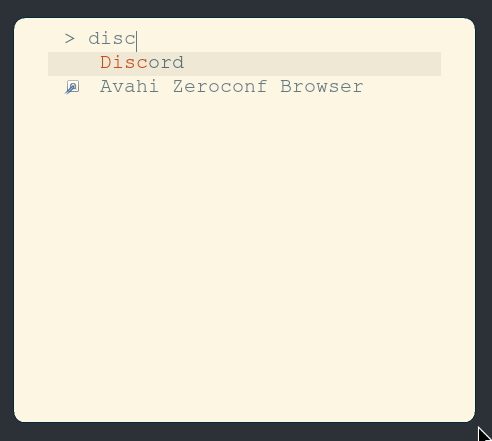
This is how my dmenu looks at the moment, no icon and discord will not launch when selecting that item.
To see why an icon is not loading and why it will not start through there I
start by checking their .desktop file to see where it is pointing to. I
typically do a manual system installation the and copy the .desktop file to
/usr/share/applications. One thing stands out to me right away, the Exec cmd
is using a different path than the one I am creating on my script. What I have
on my script used to work at least for version 0.119 so something must’ve
changed between then and now.
# Exec field from the discrod.desktop file installed by the 0.130 installer
Exec=/usr/share/discord/Discord

# This is the symlink that I used to create
sudo ln -sf -v /opt/Discord/Discord /usr/bin/Discord
Ok easy I’ll just update my symlink creation, this should fix the issue of my dmenu not opening discord. And just as I thought it did properly open the application after that change. Now onto the icon.
This is something I did not know, I’ve never done anything with icons on linux
and did not know where they get stored. After a quick search I find that system
wide icons are stored in /usr/share/icons/5. A quick grep on that directory
verified that there is not any file from discord already, this somewhat confirms
that a missing icon file is the cause of the issue. The png that comes with the
installer is a 256x256 picture so I add a quick step on my installer to copy
that file to /usr/share/icons/hicolor/256x256/apps/discord.png and that is
it!!
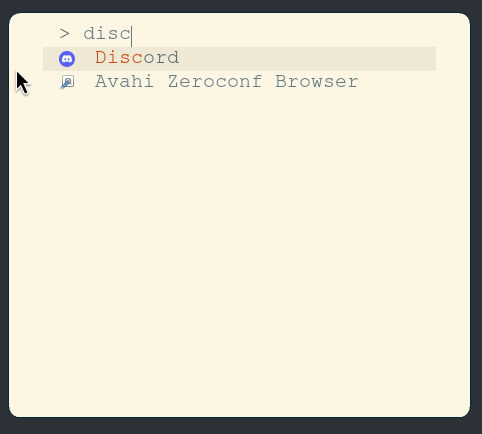
I finally get to use my dmenu to launch discord in niri with a working icon.
### RTFM win
This was a perfect example of how much reading documentation actually helps. Almost all my questions were answered with documentation. Yet another win for the RTFM (Read The Friendly Manual 😜) crowd. Anyways, at the end this is the script that worked for me. Well then, another debug session done and onto the next one!